ツイストボーンの生成 (Generate Twist Bones)
- This page is available in English: English
肘に近い前腕の一部をカバーするツイストボーンを生成することで、肘関節の見栄えを改善します。
制約(Constraints)を伴う新しいツイストボーンを作成し、そのボーンを使用するアバターのすべてのメッシュのボーンウェイトを自動的に塗り替えます。
🚧🚧🚧 このコンポーネントは現在アルファ段階です。 🚧🚧🚧
現時点では、ベースメッシュのArmatureの一部であるメッシュのみを完全にサポートしています。
現在のバージョンでは、VRCFury Armature Linkで使用される追加のメッシュに対してツイストボーンを生成することはできません。 また、Modular Avatar Merge Armatureで使用される追加のメッシュに対してツイストボーンを生成することはできない可能性があります。
どちらも将来的にサポートされる予定ですが、実現にはかなりの困難が伴います。 このコンポーネントは、アバターの素肌にとって有益であるため、この開発状況のままリリースされています。
ご理解のほどよろしくお願いいたします。
腕にツイストボーンを追加する前と後のビデオ比較。肘関節でアウトラインがどのように食い込んでいるかに注目してください。
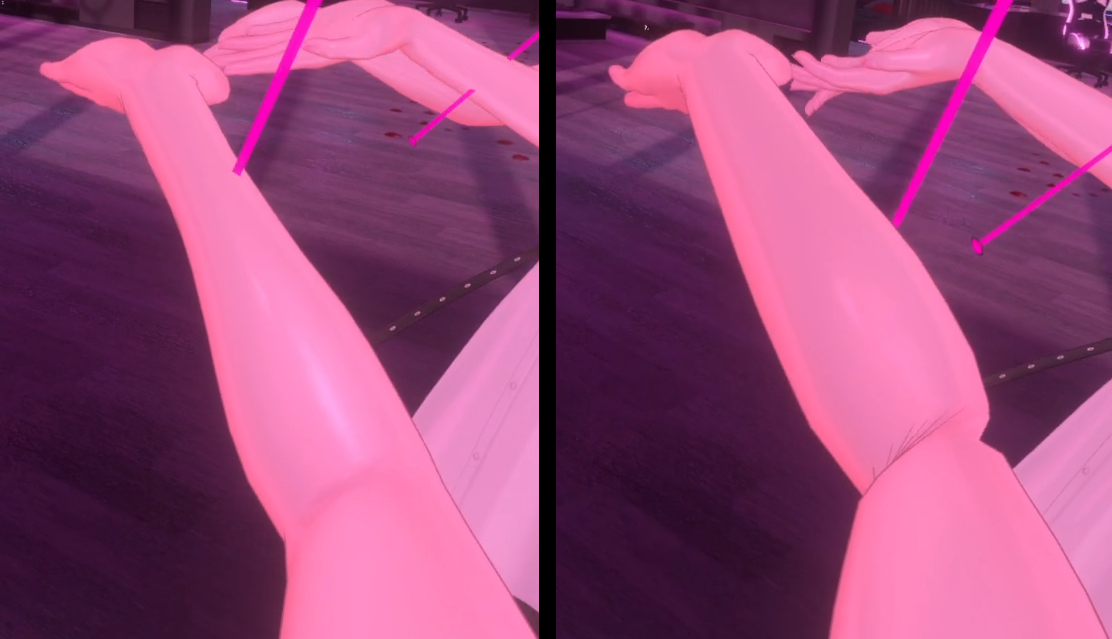 左:Generate Twist Bones有効 / 右:元のアバター
もしこの無料ツールがお役に立ちましたら、Patreonにアクセスして制作のサポートをお願いします。
Patreonのリワードとして追加のツールも入手できます。
使用方法
このコンポーネントを使用するには:
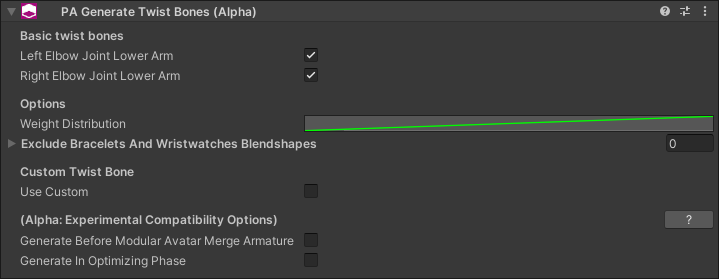
- アバターの任意の場所に「PA Generate Twist Bones」コンポーネントを追加します。
- ツールは、肘に近い前腕の部分をツイストさせることで肘関節を処理するようにセットアップされます。
このコンポーネントの使用に問題がある場合は、Discordサーバーで問題を報告してください。 ありがとうございます!
🚧🚧🚧 このコンポーネントは現在アルファ段階です。 🚧🚧🚧
現時点では、ベースメッシュのArmatureの一部であるメッシュのみを完全にサポートしています。
現在のバージョンでは、VRCFury Armature Linkで使用される追加のメッシュに対してツイストボーンを生成することはできません。 また、Modular Avatar Merge Armatureで使用される追加のメッシュに対してツイストボーンを生成することはできない可能性があります。
どちらも将来的にサポートされる予定ですが、実現にはかなりの困難が伴います。 このコンポーネントは、アバターの素肌にとって有益であるため、この開発状況のままリリースされています。
ご理解のほどよろしくお願いいたします。
オプション:ウェイト配分のカスタム
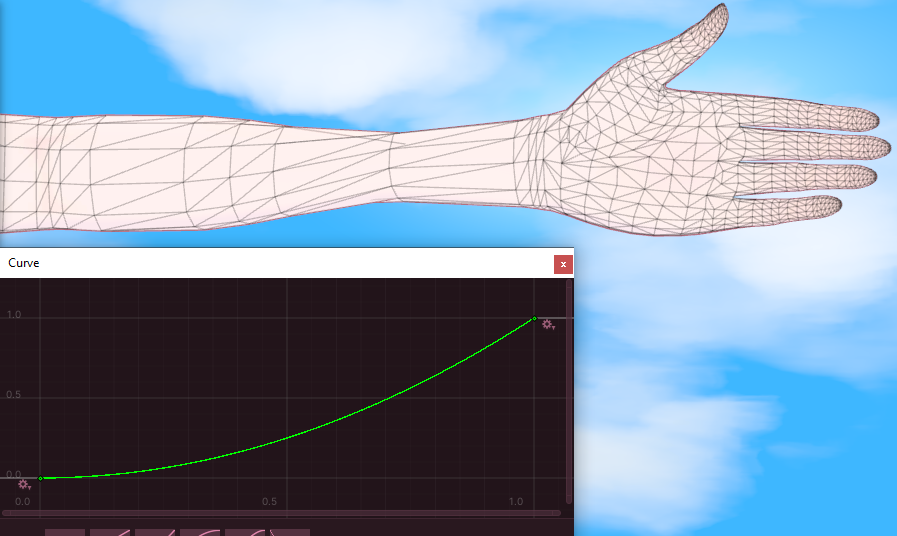
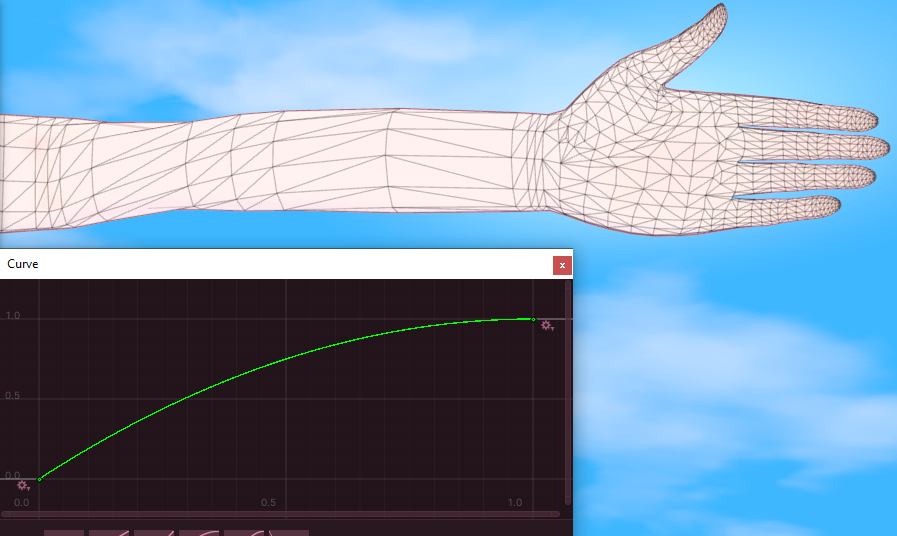
前腕ボーンと手ボーンの間のスペース内にある頂点は、前腕ボーンからの距離に基づいて塗り替えられます。
コンポーネントはデフォルトで線形ウェイト配分を使用します。つまり、ウェイトはその距離に正比例します。
カスタムの「ウェイト配分(Weight Distribution)」カーブを選択できます。カーブのX軸は、前腕ボーンへの正規化された距離を表します。
カーブは上り坂のような形にする必要があります。 (0,0) と (1,1) のポイントは常にそのままにしてください。
オプション:ブレスレットと腕時計
腕のブレスレットや腕時計、または SkinnedMeshRenderer(単純な MeshRenderer は含まれません)として腕の一部となっているリジッドオブジェクトを装着している場合、 それらのブレスレットを表示または非表示にする BlendShapes を指定する必要があります。これらの BlendShapes は、どの頂点がそのブレスレットの一部であるかを判断するために使用されます。
パフォーマンスに関する考慮事項
各ツイストボーン:
- メッシュスキニングに使用されるアバターのメインArmatureに1つのボーンを追加します。
- 1つの制約(Constraint)を追加します。
- V2.1.0以降:プロジェクトにVRChat 3.7.0以上がインストールされている場合、Unityの「Aim Constraint」の代わりに「VRC Aim Constraint」コンポーネントを生成します。
デフォルトでは、コンポーネントは各腕に1つずつツイストボーンを追加し、メッシュスキニングに使用される合計2つのボーンと2つの制約が作成されます。
異なる SkinnedMeshRenderer の Armature 上に同じツイストボーンを作成する複数のコンポーネントがある場合でも、 Armature がマージされたときに実質的に同じボーンであれば、制約は1つだけ作成されます。
実験的な互換性オプション
🚧🚧🚧 これらのオプションは実験的なものであり、今後のアップデートで削除される可能性があります。 🚧🚧🚧
このコンポーネントは現在アルファ段階にあります。VRCFury Armature Link や Modular Avatar Merge Armature などのさまざまな Armature マージシステムと連携するようにこのコンポーネントを統合するには技術的な困難があるためです。
このため、このアルファ段階では、いくつかのことを試すための実験的なオプションが利用可能です。
デフォルトモード
デフォルトでは、このコンポーネントは Modular Avatar Merge Armature の実行後に実行されます。
「Modular Avatar Merge Armatureの前に生成」
有効にすると、このコンポーネントは Modular Avatar Merge Armature が実行される前に処理されます。
これは、Modular Avatar や VRCFury が Armature をマージしようとする前に、「カスタムを使用(Use Custom)」オプションを使用して他の Armature にツイストボーンを作成するために使用できます。
「最適化フェーズで生成」
有効にすると、このコンポーネントは最適化フェーズ中に処理されます。
ツイストボーンの生成は最適化ではないため、これは最適化フェーズの誤った使用であると考えられますが、ビルドプロセスの特定のポイントでこのコンポーネントの実行を試す機会を与えます。
バージョン
- 2.1.0: プロジェクトにVRChat 3.7.0以上がインストールされている場合、Unityの「Aim Constraint」の代わりに「VRC Aim Constraint」コンポーネントを生成します。
- 1.11.1: Generate Twist Bones のヘルプ URL が localhost を指さなくなっていた問題を修正。
- 1.11.0: 追加。
分類: このコンポーネントはアプリケーションに依存しませんが、生成されるツイストボーンの品質と関連性は、ターゲットプラットフォームまたはアプリで使用されるインバースキネマティクス戦略やアニメーションシステムに大きく依存します。プラットフォームやアプリによって、特定の腕のポーズに対して腕のボーンの向きが異なる場合があるためです。これにより、一部のプラットフォームやアプリでは生成されたツイストボーンが不適切になる可能性があります。