Property Finder
全プラットフォーム
Property Finder lets you view the animatable properties of an object.
Compatibility notes
- It has been tested to work on Unity 2019, and should work on newer versions.
- 🌊 No game-specific SDK is required.
Download
The tool is free to download. It can also be downloaded using ALCOM.
Direct download
- GitHub (hai-vr/property-finder)
ALCOM
- Use this link to install our listing to ALCOM.
- Add Haï ~ Property Finder to your project using ALCOM.
How to use
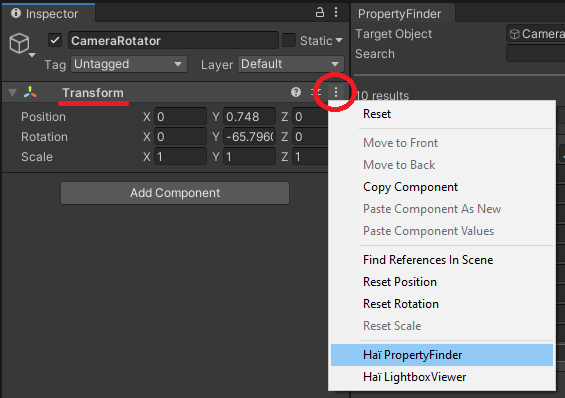
To begin, choose an object, and click the three vertical dots ⋮ next to the Transform component, and select Haï Property Finder.
You can also open it through Window > Haï > PropertyFinder.
Drag and drop the object to inspect in the Target Object field.
Filter the results further by adding search terms. You can separate search terms with a space, so the search query color rim can find results such as material._RimLitTexColor.