Physics Animation
Avatars can be affected by physics interactions. In HVR, this is called Physics Animation. This concept is also known as powered ragdolls or a control rig in other libraries or game engines.
Physics Animation modifies the characteristics of rigidbodies and applies forces on individual rigidbodies and joints of a ragdoll to make it match a pose.
By default, the pose comes from the result of an IK solver, but that pose may come from an animation being played.
Different characteristics can be applied to different limbs of the ragdoll to produce different responses to physical interactions.
Depending on the physics animation profile, the avatar may have a drastically different reaction to physics interactions.
On the left, the head and the hips try to weakly maintain their position, and the feet are prioritized.
On the right, the hands are prioritized.
The Physics Animation components in HVR are heavily inspired by a GDC talk called "Physics Animation in Uncharted 4: A Thief's End" by Michal Mach presented at GDC 2017, however, the implementation in HVR is vastly inferior to the implementation described in the talk.
Other VR games like Boneworks and Hard Bullet are notorious for using similar forms of physics animation, so HVR is not unique in this regard.
Applying Physics Animation
The main way to control Physics Animation is by setting up an HVR Avatarlike component, and enabling Use Physics Animation in that component.
HVR will automatically create rigidbodies to match the avatar, as long as the HVRUGC Avatar component was set up with collision meshes.
Then, in the hierarchy of the HVR Avatarlike object:
- Go to HVRMultipurposeRig → HVRIK → RuntimeTargets. Move and rotate the child targets to define a new pose.
- Go to HVRMultipurposeRig → HVRPhysicsAnimation → ProfileApplier. In the HVR ProfileAnimationPhysicsApplier component, edit the profile settings of each limb to get the physics reaction you need.
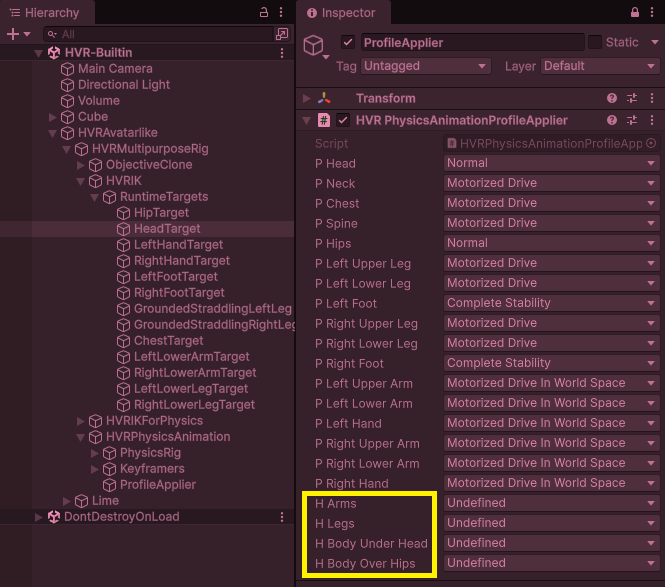
The options highlighted in yellow "H Arms, H Legs, H Body Under Head, and H Body Over Hips" let you modify multiple limbs at once.
You will have to experiment with the different profiles, but the following ones are the most important:
- Normal: The default. Tries to move to the position and world-space rotation, but gets pushed away when a parent or a child moves away.
- Complete Stability: Strongly maintains the position and world-space rotation. This is great when the feet are planted, or when the hands are firmly holding onto something.
- Motorized: Configures the joint of the corresponding limb so that the desired angle is the local-space angle relative to the parent. This is great for limbs that are flailing.
- Motorized in World Space: Configures the joint of the corresponding limb so that the desired angle is the world-space angle. This is great for limbs that are flailing where the world-space angle matters, such as feet trying to stay horizontal to the floor.
The following ones are situational:
- Angular Stability: Strongly maintains the world-space angle, without trying to move the position.
- However, when Angular Stability is applied to a chain of bones, it has the strange effect of causing that chain of bones to move rigidly together.
- Reactive: A stronger and more reactive version of Normal that is still much weaker than Complete Stability.
- However, the reactivity may cause it to overshoot more severely, and spring back and forth.