⚙️ Prefabulous Avatar V1.11.2
Fix Prefabulous was not able to compile because it was using a deprecated define VRC_SDK_VRCSDK3 that was missing on some users' projects.
Fix Prefabulous was not able to compile because it was using a deprecated define VRC_SDK_VRCSDK3 that was missing on some users' projects.
I am releasing "Denormalized Avatar Exporter", a Unity Editor tool that lets you export avatars normally designed for use in VRChat into VTubing apps, without the disruptive pre-processing steps that would normally be needed:
You don't have to normalize your avatar bones, and you don't have to export your avatar to VRM and import that VRM back into Unity.
Normalization is done when the avatar is being exported, so that you can keep editing the original avatar model file or prefabs just like anyone would normally do for a VRChat avatar.
It will also permit the use of some non-destructive avatar tools initially created for VRChat that are based on NDMF (Non-Destructive Modular Framework).
A new component, Generate Twist Bones (Alpha), has been added to Prefabulous.
This component will generate twist bones, which improves the look of the elbow joint by twisting the part of the lower arm that is closer to the elbow.
It creates new twist bones with constraints, and automatically repaints the bones weights of all meshes of the avatar which use that bone.
🚧🚧🚧 This component is currently in an alpha phase. 🚧🚧🚧
At the moment, it only fully supports meshes that are part of the base mesh armature.
The current version will not be able to generate twist bones for additional meshes used by VRCFury Armature Link, and may not be able to generate twist bones for additional meshes used by Modular Avatar Merge Armature.
Both are intended to be supported in the future, but it's significantly harder to do so. The component is still released in this state of development as it is beneficial for the bare skin of your avatar.
Thank you for your understanding.
This update does not include the Prefabulous Universal / Prefabulous for VRChat package split yet, as that particular update needs more regression testing to ensure the stability of existing projects.
Many avatars have blendshapes hidden inside the head to make the character blush.
However, when you squint, or when you puff your cheeks, these blush blendshapes will visibly clip through your face expressions.
To address this, Blush Modifier Selection is a new construction line, which can only be selected using blendshapes (it is not a traditional vertex selection). It can be left empty.
When blendshapes are added to the Blush Modifier Selection, the blendshape will be simulated to be active, so that they will be moved by the following shapes:
Unfortunately, this will not work with all avatar bases. The density of the blush mesh needs to be similar (or half as similar) to the face mesh itself. If it's a gigantic polygon, it will not work so well.
Functionality almost identical to Prefabulous Convert Blendshape Conventions has been added natively to FaceTra Shape Creator, in the Output section. This only affects blendshapes that FaceTra creates, and will not affect any other non-face tracking related blendshapes.
A new knowledge sharing article has been published, "Animating locomotion using OSC Trackers".
Hello,
This is an advance notice regarding a future change for Prefabulous Avatar.
In a future update, Prefabulous will be split into two packages:
The aim of this split is to allow the development of Prefabulous Universal components in a way that benefits avatar frameworks of other social VR platforms, apps, and non-social VR apps (for instance, any VRM-compatible app).
Most Prefabulous for VRChat components will depend on VRChat-specific animators and animation quirks, or component structures pertaining specifically to VRChat that would be uncommon in other social VR apps.
For most VRChat users, this change should be invisible if you use VCC. If you are a developer who internally references classes or entities within Prefabulous, some changes are expected as described below.
If you have any questions, please ask me about it on the Discord server.
Thank you for your understanding.
This describes a future update, this has not yet been released at this time of writing.
For most VRChat users, this change should be invisible.
However, if you're installing Prefabulous without VCC, you will need to:
If you're a developer who might be concerned by such changes, you're invited to let me know about it on the Discord server.
Fix Replace Textures should no longer ignore disabled objects.
This is a technical update for Prefabulous Avatar:
Re-bake lighting of Lightbox scene in Unity 2022:
This update provides no changes on the trackers themselves, only compatibility improvements.
{
  "useHip": true,
  "useChest": false,
  "chestSerialA": "",
  "chestSerialB": "",
  "chestPrioritize": false,
  "noUi": false,
  "vrcOscPort": -1
}
Until this update, properties were using the value in the Scene as the "opposite" value. This means you only need to specify the new value of the property, and Vixen would animate between your value and the scene value.
Properties can now use a Custom value of your choice as the "opposite" value.
Circumvent a possible bug in VCC by removing NDMF 1.4 from vpmDependencies:
This is a technical update for Prefabulous Avatar:
Three new components have been added to Prefabulous Avatar.
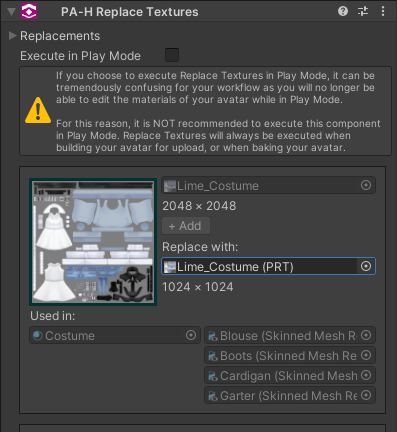
This component lets you upload multiple versions of your avatar but with different textures, without needing to duplicate the materials.
It also displays which materials use which textures, although you could also be using lilAvatarUtils for this.
This component lets you convert blendshapes from one naming convention to another naming convention, such as converting Unified Expressions blendshapes to ARKit blendshapes.

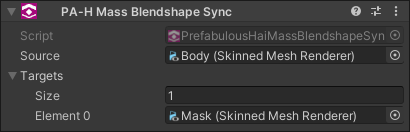
This component will synchronize all blendshapes that two meshes share in common.
This is ideally used with renderers that have a massive quantity of blendshapes that need to be synced, such as face tracking.
A new knowledge sharing devlog has been published, "Multi-Toe Tracking".
In the Multi-Toe Tracking research page, you can read about my attempts to build a toe tracking device that supports multiple toes.
Update dependencies to allow installing Convert ComboGesture to FaceEmo with FaceEmo 1.5
Update dependencies to allow installing Prefabulous Avatar with NDMF 1.3
Assign UV Tile can now assign the entire mesh to a UV Tile.
Do this by switching the mode from BlendShapes to Entire Mesh.
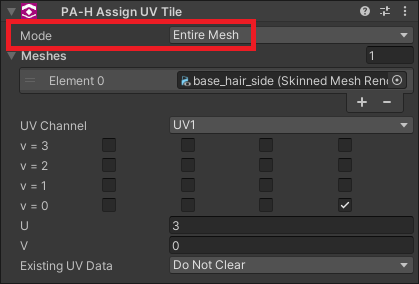
"Entire Mesh" should be used alongside an avatar optimization tool that will merge existing meshes, such as d4rkpl4y3r's d4rkAvatarOptimizer or anatawa12's AvatarOptimizer.
Prefabulous Avatar does not provide any mesh optimization components that rectifies animation paths at this time.
Recalculate Normals should now properly work on avatars that were not posed like the model, or had a different orientation than the model.