<?xml version="1.0" encoding="utf-8"?>
<feed xmlns="http://www.w3.org/2005/Atom">
    <id>https://docs.hai-vr.dev/ja/updates</id>
    <title>Haï~ Blog</title>
    <updated>2026-05-21T10:00:00.000Z</updated>
    <generator>https://github.com/jpmonette/feed</generator>
    <link rel="alternate" href="https://docs.hai-vr.dev/ja/updates"/>
    <subtitle>Haï~ Blog</subtitle>
    <icon>https://docs.hai-vr.dev/ja/img/favicon.ico</icon>
    <entry>
        <title type="html"><![CDATA[🔺 HVR Basis Vixxy]]></title>
        <id>https://docs.hai-vr.dev/ja/updates/2026/05/21</id>
        <link href="https://docs.hai-vr.dev/ja/updates/2026/05/21"/>
        <updated>2026-05-21T10:00:00.000Z</updated>
        <summary type="html"><![CDATA[A new product has been published: Vixxy is a user-accessible interface to toggle or trigger effects on avatars in Basis Framework projects.]]></summary>
        <content type="html"><![CDATA[<div><p><span></span></p><div class="hai_tag_ZcC4 hai_tag_requires_basis_QHoe"><svg width="24" height="24" viewBox="-1 -1 26 23" xmlns="http://www.w3.org/2000/svg" class="hai_icon_Cqd7" role="img"><path d="m12 0 12 20.78H0Z" fill="red" stroke="#000" stroke-width="1.5" stroke-linejoin="round"></path></svg> <span class="notranslate">Basis</span></div><p></p></div>
<p>A new product has been published: <strong>Vixxy</strong> is a user-accessible interface to toggle or trigger effects on avatars in Basis Framework projects.</p>
<p>It is primarily intended to be used through the Unity inspector directly by <strong>non-programmer users</strong>.</p>
<video controls="" muted="" width="816"><source src="https://large.docs.cdn.hai-vr.dev/assets/docs/gX02sy0QQp-f.mp4"></video>
<p>Effects may be triggered based on the menu, voice, various measurements on the avatar, face tracking, or inputs received from external hardware and software.</p>
<p>It can toggle objects ON and OFF, change shader material settings, blendshapes, textures inside materials, and the text inside TextMeshPro components.</p>
<video controls="" muted="" width="816"><source src="https://large.docs.cdn.hai-vr.dev/assets/docs/bdH9zKqkQE-f.mp4"></video>
<p>🗒️ <a href="https://docs.hai-vr.dev/ja/docs/basis/avatar-customization/vixxy">Open documentation</a></p>]]></content>
    </entry>
    <entry>
        <title type="html"><![CDATA[✨ Prefabulous Universal V2.2.0]]></title>
        <id>https://docs.hai-vr.dev/ja/updates/2026/03/18/p1</id>
        <link href="https://docs.hai-vr.dev/ja/updates/2026/03/18/p1"/>
        <updated>2026-03-18T23:25:00.000Z</updated>
        <summary type="html"><![CDATA[A language selector has been added to the Recalculate Normals and Generate Twist Bones components, in Japanese.]]></summary>
        <content type="html"><![CDATA[<p>A language selector has been added to the <em>Recalculate Normals</em> and <em>Generate Twist Bones</em> components, in Japanese.</p>
<p>All Prefabulous Universal components now have a clickable help URL in the inspector.</p>
<p>Components from Prefabulous Universal will now run with NDMF 1.8 when building the avatar for non-VRChat platforms and apps such as Resonite.</p>
<ul>
<li>Generate Twist Bones will now generate Unity Constraints instead of VRC Constraints when targeting a non-VRChat platform.</li>
</ul>]]></content>
    </entry>
    <entry>
        <title type="html"><![CDATA[✨ Skinned Mesh Constraint Builder V1.3.0]]></title>
        <id>https://docs.hai-vr.dev/ja/updates/2026/03/18/p0</id>
        <link href="https://docs.hai-vr.dev/ja/updates/2026/03/18/p0"/>
        <updated>2026-03-18T23:16:00.000Z</updated>
        <summary type="html"><![CDATA[A language selector has been added to Skinned Mesh Constraint Builder:]]></summary>
        <content type="html"><![CDATA[<p>A language selector has been added to Skinned Mesh Constraint Builder:</p>
<ul>
<li>Add language selector for French, Japanese, Korean, Simplified Chinese, Traditional Chinese.</li>
</ul>]]></content>
    </entry>
    <entry>
        <title type="html"><![CDATA[✨ Lightbox Viewer 2.5.0-beta.3]]></title>
        <id>https://docs.hai-vr.dev/ja/updates/2026/02/04/p0</id>
        <link href="https://docs.hai-vr.dev/ja/updates/2026/02/04/p0"/>
        <updated>2026-02-04T01:17:00.000Z</updated>
        <summary type="html"><![CDATA[In Edit Mode, hide objects that are hidden by the visibility icon in the scene hierarchy tab.]]></summary>
        <content type="html"><![CDATA[<p>In Edit Mode, hide objects that are hidden by the visibility icon in the scene hierarchy tab.</p>
<p>Fix object change events should no longer trigger in Play Mode, which was causing errors in the logs.</p>]]></content>
    </entry>
    <entry>
        <title type="html"><![CDATA[⚙️ Animation Viewer V2.1.1]]></title>
        <id>https://docs.hai-vr.dev/ja/updates/2026/01/28/p0</id>
        <link href="https://docs.hai-vr.dev/ja/updates/2026/01/28/p0"/>
        <updated>2026-01-28T13:33:00.000Z</updated>
        <summary type="html"><![CDATA[- Fix thumbnail size setting now applies properly when the value is changed.]]></summary>
        <content type="html"><![CDATA[<ul>
<li>Fix thumbnail size setting now applies properly when the value is changed.<!-- -->
<ul>
<li>Previously, it may have been applying an old value for the setting.</li>
</ul>
</li>
</ul>
<p>The above changes have been contributed by <strong><a href="https://github.com/mekanyanko" target="_blank" rel="noopener noreferrer">mekanyanko (めかにゃんこ)</a></strong>.</p>]]></content>
    </entry>
    <entry>
        <title type="html"><![CDATA[⚙️ Skinned Mesh Constraint Builder V1.2.1 / Chillaxins V1.2.0]]></title>
        <id>https://docs.hai-vr.dev/ja/updates/2025/12/03/p0</id>
        <link href="https://docs.hai-vr.dev/ja/updates/2025/12/03/p0"/>
        <updated>2025-12-03T06:11:00.000Z</updated>
        <summary type="html"><![CDATA[⚙️ Skinned Mesh Constraint Builder V1.2.1]]></summary>
        <content type="html"><![CDATA[<h2 class="anchor anchorWithStickyNavbar_LWe7" id="️-skinned-mesh-constraint-builder-v121">⚙️ Skinned Mesh Constraint Builder V1.2.1<a href="https://docs.hai-vr.dev/ja/updates/2025/12/03/p0#%EF%B8%8F-skinned-mesh-constraint-builder-v121" class="hash-link" aria-label="⚙️ Skinned Mesh Constraint Builder V1.2.1 への直接リンク" title="⚙️ Skinned Mesh Constraint Builder V1.2.1 への直接リンク">​</a></h2>
<ul>
<li>Make VRCSDK compatibility more future-proof.<!-- -->
<ul>
<li>Internal method is <code>VRCConstraintBase.GetPerSourcePositionOffsets()</code> no longer invoked.</li>
</ul>
</li>
</ul>
<h2 class="anchor anchorWithStickyNavbar_LWe7" id="chillaxins-v120">Chillaxins V1.2.0<a href="https://docs.hai-vr.dev/ja/updates/2025/12/03/p0#chillaxins-v120" class="hash-link" aria-label="Chillaxins V1.2.0 への直接リンク" title="Chillaxins V1.2.0 への直接リンク">​</a></h2>
<ul>
<li>Improve compatibility with Basis Framework avatar builds non-Windows OS.</li>
</ul>]]></content>
    </entry>
    <entry>
        <title type="html"><![CDATA[⚙️ Skinned Mesh Constraint Builder V1.2.0]]></title>
        <id>https://docs.hai-vr.dev/ja/updates/2025/11/27/p0</id>
        <link href="https://docs.hai-vr.dev/ja/updates/2025/11/27/p0"/>
        <updated>2025-11-27T23:32:00.000Z</updated>
        <summary type="html"><![CDATA[- Fix compatibility with VRCSDK 3.10 where VRCConstraintBase.GetPerSourcePositionOffsets() is no longer public.]]></summary>
        <content type="html"><![CDATA[<ul>
<li>Fix compatibility with VRCSDK 3.10 where <code>VRCConstraintBase.GetPerSourcePositionOffsets()</code> is no longer public.<!-- -->
<ul>
<li>Thanks to @JLChnToZ for reporting this issue (<a href="https://github.com/hai-vr/constraint-tools/issues/2" target="_blank" rel="noopener noreferrer">#2</a>).</li>
</ul>
</li>
<li>Improve component startup time when hiding the component icon in the scene.</li>
</ul>]]></content>
    </entry>
    <entry>
        <title type="html"><![CDATA[🔺 HVR Basis Face Tracking (Update)]]></title>
        <id>https://docs.hai-vr.dev/ja/updates/2025/10/03/p1</id>
        <link href="https://docs.hai-vr.dev/ja/updates/2025/10/03/p1"/>
        <updated>2025-10-03T18:04:00.000Z</updated>
        <summary type="html"><![CDATA[HVR Basis Face Tracking has been updated.]]></summary>
        <content type="html"><![CDATA[<div><p><span></span></p><div class="hai_tag_ZcC4 hai_tag_requires_basis_QHoe"><svg width="24" height="24" viewBox="-1 -1 26 23" xmlns="http://www.w3.org/2000/svg" class="hai_icon_Cqd7" role="img"><path d="m12 0 12 20.78H0Z" fill="red" stroke="#000" stroke-width="1.5" stroke-linejoin="round"></path></svg> <span class="notranslate">Basis</span></div><p></p></div>
<p><strong>HVR Basis Face Tracking</strong> has been updated.</p>
<p>It should work better with ARKit avatars, as we were not requesting some face tracking traits correctly, so VRCFaceTracking would not
send them to us. No avatar reupload is needed.</p>
<p>This update includes some performance improvements and some code preparation for future use by <em>HVR Basis AvatarOptimizer</em>, so that
avatar optimization tools may detect which blendshapes should not be removed from the mesh.</p>
<h2 class="anchor anchorWithStickyNavbar_LWe7" id="backend-changes">Backend changes<a href="https://docs.hai-vr.dev/ja/updates/2025/10/03/p1#backend-changes" class="hash-link" aria-label="Backend changes への直接リンク" title="Backend changes への直接リンク">​</a></h2>
<h3 class="anchor anchorWithStickyNavbar_LWe7" id="avoid-string-comparisons-in-hvr-addresses">Avoid string comparisons in HVR addresses<a href="https://docs.hai-vr.dev/ja/updates/2025/10/03/p1#avoid-string-comparisons-in-hvr-addresses" class="hash-link" aria-label="Avoid string comparisons in HVR addresses への直接リンク" title="Avoid string comparisons in HVR addresses への直接リンク">​</a></h3>
<ul>
<li>Reduce the number of string comparisons by using int addresses instead of string addresses.</li>
<li>Addresses are mapped to int equivalents as early as possible.</li>
<li>Modify AcquisitionService and all scripts that depend on it to use int addresses.</li>
<li>Add HelpUrls to user-facing HVR behaviours.</li>
</ul>
<h3 class="anchor anchorWithStickyNavbar_LWe7" id="try-to-fix-combined-face-tracking-were-not-requested">Try to fix combined face tracking were not requested<a href="https://docs.hai-vr.dev/ja/updates/2025/10/03/p1#try-to-fix-combined-face-tracking-were-not-requested" class="hash-link" aria-label="Try to fix combined face tracking were not requested への直接リンク" title="Try to fix combined face tracking were not requested への直接リンク">​</a></h3>
<ul>
<li>Some of the face tracking parameters that were needed by the default face tracking templates were not requested from VRCFaceTracking.</li>
<li>Update the JSON file (for older versions of VRCFaceTracking) and the OSCQuery response to match.</li>
<li>Fix UnifiedExpressions-Advanced-Strict incorrectly references addresses without the v2 prefix.</li>
</ul>
<h3 class="anchor anchorWithStickyNavbar_LWe7" id="expose-functions-for-hvr-basis-avataroptimizer">Expose functions for HVR Basis AvatarOptimizer<a href="https://docs.hai-vr.dev/ja/updates/2025/10/03/p1#expose-functions-for-hvr-basis-avataroptimizer" class="hash-link" aria-label="Expose functions for HVR Basis AvatarOptimizer への直接リンク" title="Expose functions for HVR Basis AvatarOptimizer への直接リンク">​</a></h3>
<ul>
<li>Expose public functions on BlendshapeActuation and AutomaticFaceTracking for future use by HVR Basis AvatarOptimizer.</li>
</ul>]]></content>
    </entry>
    <entry>
        <title type="html"><![CDATA[✨ Lightbox Viewer 2.5.0-beta.1]]></title>
        <id>https://docs.hai-vr.dev/ja/updates/2025/10/03/p0</id>
        <link href="https://docs.hai-vr.dev/ja/updates/2025/10/03/p0"/>
        <updated>2025-10-03T17:51:00.000Z</updated>
        <summary type="html"><![CDATA[Lightbox Viewer has been updated to support URP projects.]]></summary>
        <content type="html"><![CDATA[<p>Lightbox Viewer has been updated to support URP projects.</p>
<p>Lightbox Viewer is now compatible with the following render pipeline configurations:</p>
<ul>
<li>BIRP Light Probes.</li>
<li>BIRP VRCLightVolumes by RED_SIM.</li>
<li>URP Adaptive Probe Volumes.</li>
<li>URP Light Probes.</li>
</ul>
<p>Features:</p>
<ul>
<li>Detect and support URP projects. When the current project uses URP:<!-- -->
<ul>
<li>Don't suggest installing the Post-Processing V2 package.</li>
<li>Never switch to VRCLightVolumes, even if that package is installed in the project.</li>
<li>Switch to a different scene based on whether the Quality settings use Light Probes instead of Adaptive Probe Volumes.</li>
<li>Detect when Quality settings change, and switch between the Light Probes scene and the Adaptive Probe Volumes scene accordingly.</li>
</ul>
</li>
</ul>
<p>Changes:</p>
<ul>
<li>Attempt an optimization that removes the need for copying the texture from the GPU to the CPU.</li>
<li>Change Edit mode strategy for performance:<!-- -->
<ul>
<li>Previously, Edit Mode was copying the avatar every frame, so that we don't accidentally cause the avatar to be modified.</li>
<li>This change now copies the avatar to a hidden GameObject in the hierarchy and marked non-saved, if the reference to the Object To View does not change.</li>
<li>Use object change events to detect when anything changes in the scene. If there is any change that pertains to a non-transform, we destroy the copied object and create a new one.</li>
<li>This copied object is moved 10_000 units downwards between render cycles.</li>
<li>Don't disable the original avatar between render cycles, because enabling the avatar is slow.</li>
<li>In the copy, remove the Animators, because they take time to bind and we don't need them.</li>
</ul>
</li>
</ul>
<p>Fixes:</p>
<ul>
<li>Try to fix an issue where the depth was affecting how the view was rendered in a Unity 6.2 Basis project.</li>
</ul>
<p>🗒️ <a href="https://docs.hai-vr.dev/ja/docs/products/lightbox-viewer/urp">Open documentation</a>.</p>]]></content>
    </entry>
    <entry>
        <title type="html"><![CDATA[🔺 HVR Basis Face Tracking (Update)]]></title>
        <id>https://docs.hai-vr.dev/ja/updates/2025/09/28/p0</id>
        <link href="https://docs.hai-vr.dev/ja/updates/2025/09/28/p0"/>
        <updated>2025-09-28T00:00:00.000Z</updated>
        <summary type="html"><![CDATA[HVR Basis Face Tracking has been migrated to the new Basis networking system.]]></summary>
        <content type="html"><![CDATA[<div><p><span></span></p><div class="hai_tag_ZcC4 hai_tag_requires_basis_QHoe"><svg width="24" height="24" viewBox="-1 -1 26 23" xmlns="http://www.w3.org/2000/svg" class="hai_icon_Cqd7" role="img"><path d="m12 0 12 20.78H0Z" fill="red" stroke="#000" stroke-width="1.5" stroke-linejoin="round"></path></svg> <span class="notranslate">Basis</span></div><p></p></div>
<p><strong>HVR Basis Face Tracking</strong> has been migrated to the new Basis networking system.</p>
<p>Instructions for previous Face Tracking avatar users:</p>
<ul>
<li>
<p>If you have previously used Face Tracking in Basis, do the following:</p>
</li>
<li>
<p>Remove all components that were part of the previous Face Tracking instructions. That includes:</p>
<ul>
<li>Remove the Feature Networking component</li>
<li>Remove the HVR Avatar Comms component</li>
<li>Remove the Eye Tracking Bone Actuation component</li>
<li>Remove the Blendshape Actuation component</li>
<li>Remove the OSC Acquisition component</li>
<li>Remove the Acquisition Service component</li>
</ul>
</li>
<li>
<p>To install the new Face Tracking, <a href="https://docs.hai-vr.dev/docs/basis/avatar-customization/face-tracking" target="_blank" rel="noopener noreferrer">do the following</a>:</p>
<ul>
<li>Create a new GameObject inside your avatar. Give it a name of your choice, like FaceTracking.</li>
<li>Add the Automatic Face Tracking component.</li>
<li>In the inspector of the Automatic Face Tracking component, press the "Create VRCFaceTracking JSON file" button.</li>
<li>You will need to do this even if you have used previous versions of Face Tracking in Basis</li>
</ul>
</li>
</ul>
<p>The new face tracking has been modified to work with the Steam version of VRCFaceTracking (it now has OSCQuery),
but it should also work with old versions of VRCFaceTracking that were not installed from Steam.</p>
<h2 class="anchor anchorWithStickyNavbar_LWe7" id="backend-changes">Backend changes<a href="https://docs.hai-vr.dev/ja/updates/2025/09/28/p0#backend-changes" class="hash-link" aria-label="Backend changes への直接リンク" title="Backend changes への直接リンク">​</a></h2>
<h3 class="anchor anchorWithStickyNavbar_LWe7" id="migrate-face-tracking-to-newest-basis-networking">Migrate face tracking to newest Basis networking<a href="https://docs.hai-vr.dev/ja/updates/2025/09/28/p0#migrate-face-tracking-to-newest-basis-networking" class="hash-link" aria-label="Migrate face tracking to newest Basis networking への直接リンク" title="Migrate face tracking to newest Basis networking への直接リンク">​</a></h3>
<ul>
<li>Migrate to newer Basis avatar networking systems:<!-- -->
<ul>
<li>Remove GUID-based networking identifiers, which was a remnant of the previous networking system where BasisAvatarMonoBehaviour did not exist and all packets had to be routed manually to their destination components.</li>
<li>Migrate networking to the new BasisAvatarMonoBehaviour networking system, which handles packet routing on its own by transmitting packets based on the component rather than based on the avatar.</li>
</ul>
</li>
<li>Add Automatic Face Tracking component:<!-- -->
<ul>
<li>The Automatic Face Tracking component is now the entry point to adding HVR face tracking capabilities to the avatar.</li>
<li>This component automatically detects all SkinnedMeshRenderer components on the avatar that have ARKit or Unified Expressions blendshapes on it.</li>
<li>By default, this component uses the basic face tracking definition files that are bundled with the application, but this can be either overridden by the user or supplemented.<!-- -->
<ul>
<li>Due to this, the face tracking assets are now addressables.</li>
</ul>
</li>
<li>This components automatically starts an OSC service on the wearer.</li>
</ul>
</li>
<li>Improve the handling of face tracking data:<!-- -->
<ul>
<li>Add Address Overrides to the actuation definition file, so that we can define default values for the eyelids.</li>
<li>Work towards the mutualization of the interpolation of addresses between Eye Tracking and Face Tracking.</li>
<li>Actuators now introspect which blendshapes actually exist on the target renderers, and will no longer try to network any actuator that has no blendshape associated with it.</li>
<li>Add more debugging in the blendshape actuation definition file editor.</li>
<li>Fix TongueRoll actuator was targeting the wrong blendshape.</li>
</ul>
</li>
<li>Move the package to dev.hai-vr.basis.comms/</li>
</ul>
<h3 class="anchor anchorWithStickyNavbar_LWe7" id="change-vrcfacetracking-setup-process">Change VRCFaceTracking setup process<a href="https://docs.hai-vr.dev/ja/updates/2025/09/28/p0#change-vrcfacetracking-setup-process" class="hash-link" aria-label="Change VRCFaceTracking setup process への直接リンク" title="Change VRCFaceTracking setup process への直接リンク">​</a></h3>
<ul>
<li>In the Automatic Face Tracking component, the user now presses a button to create the face tracking JSON file used by VRCFaceTracking.</li>
<li>We want to ensure we overwrite any previous version of face tracking that may have already been installed by previous users of the previous system, so we're changing the dummy avatar ID to a different one. That way, we're sure this is really the file that will be loaded by VRCFaceTracking.</li>
</ul>
<h3 class="anchor anchorWithStickyNavbar_LWe7" id="fix-always-update-local-eye-angles">Fix always update local eye angles<a href="https://docs.hai-vr.dev/ja/updates/2025/09/28/p0#fix-always-update-local-eye-angles" class="hash-link" aria-label="Fix always update local eye angles への直接リンク" title="Fix always update local eye angles への直接リンク">​</a></h3>
<ul>
<li>Update local eye angles, even if no address has changed.</li>
<li>This should fix an issue where the eyes were always looking forward.</li>
</ul>
<h3 class="anchor anchorWithStickyNavbar_LWe7" id="add-a-fake-oscquery-service-to-cope-with-the-steam-version-of-vrcfacetracking">Add a fake OSCQuery service to cope with the Steam version of VRCFaceTracking<a href="https://docs.hai-vr.dev/ja/updates/2025/09/28/p0#add-a-fake-oscquery-service-to-cope-with-the-steam-version-of-vrcfacetracking" class="hash-link" aria-label="Add a fake OSCQuery service to cope with the Steam version of VRCFaceTracking への直接リンク" title="Add a fake OSCQuery service to cope with the Steam version of VRCFaceTracking への直接リンク">​</a></h3>
<ul>
<li>The Steam Version of VRCFaceTracking 5.3.2.0 does not accept /avatar/change events, it relies only on OSCQuery for initialization.</li>
<li>We now impersonate the OSCQuery service by doing the following:<!-- -->
<ul>
<li>A) Opens an HTTP service on a random port:<!-- -->
<ul>
<li>When queried for any URL that ends with <code>/avatar</code>, it replies with a pre-determined message (check out <code>response-avtr.json</code>).</li>
<li>When queried for any other URL, it replies with another pre-determined message (check out <code>response.json</code>).</li>
</ul>
</li>
<li>B) Advertises that port as a service on mDNS as <code>_oscjson._tcp</code> with the instance name <code>VRChat-Client-XXXXXX</code> where XXXXXX is a random number between 100000 and 999999.</li>
<li>C) Queries for <code>_oscjson._tcp</code> once when the service starts.</li>
<li>A and B are sufficient for VRCFaceTracking to detect our program if the OsushiQuery service is already running when VRCFaceTracking starts.</li>
<li>C is needed to handle the case where VRCFaceTracking is already running before our program starts the OsushiQuery service.</li>
<li>The HTTP service completely violates the OSCQuery protocol and is not intended to be read by any other program other than VRCFaceTracking.</li>
</ul>
</li>
<li>The JSON file in the users' directory is still needed to function properly.</li>
<li>This also means that the application requests a pre-determined list of parameters from VRCFaceTracking, as opposed to the JSON file which could previously be updated separately.</li>
<li>Add a MeaMod.DNS package as instructed by dooly.</li>
</ul>
<h3 class="anchor anchorWithStickyNavbar_LWe7" id="update-acquisition-server-to-accept-vrcfacetracking-being-initialized-from-oscquery">Update acquisition server to accept VRCFaceTracking being initialized from OSCQuery<a href="https://docs.hai-vr.dev/ja/updates/2025/09/28/p0#update-acquisition-server-to-accept-vrcfacetracking-being-initialized-from-oscquery" class="hash-link" aria-label="Update acquisition server to accept VRCFaceTracking being initialized from OSCQuery への直接リンク" title="Update acquisition server to accept VRCFaceTracking being initialized from OSCQuery への直接リンク">​</a></h3>
<ul>
<li>Since VRCFaceTracking is now being initialized from OSCQuery, we can't use the address that don't start with "/avatar/parameters" like we used to.</li>
<li>Rectify the paths in the JSON file to match the OSCQuery paths.</li>
<li>Strip that from the messages we receive to restore previous behaviour.</li>
</ul>]]></content>
    </entry>
    <entry>
        <title type="html"><![CDATA[✨ Lightbox Viewer URP V1.0.0-alpha.5]]></title>
        <id>https://docs.hai-vr.dev/ja/updates/2025/07/11/p0</id>
        <link href="https://docs.hai-vr.dev/ja/updates/2025/07/11/p0"/>
        <updated>2025-07-11T00:00:00.000Z</updated>
        <summary type="html"><![CDATA[Lightbox Viewer URP for the Basis Framework has been added as a new package.]]></summary>
        <content type="html"><![CDATA[<p><em>Lightbox Viewer URP for the Basis Framework</em> has been added as a new package.</p>
<p>This package is meant to be used on URP <span></span></p><div class="hai_tag_ZcC4 hai_tag_requires_basis_QHoe"><svg width="24" height="24" viewBox="-1 -1 26 23" xmlns="http://www.w3.org/2000/svg" class="hai_icon_Cqd7" role="img"><path d="m12 0 12 20.78H0Z" fill="red" stroke="#000" stroke-width="1.5" stroke-linejoin="round"></path></svg> <span class="notranslate">Basis</span></div> projects in Unity 6,
with Adaptive Probe Volumes enabled.<p></p>
<p>This early version does not support post-processing, and it does not support traditional Light Probes.</p>
<p>🗒️ <a href="https://docs.hai-vr.dev/ja/docs/products/lightbox-viewer/urp">Open documentation</a>.</p>]]></content>
    </entry>
    <entry>
        <title type="html"><![CDATA[⚙️ Animator As Code V1.2.0 / Animator As Code VRChat V1.1.2 / Prefabulous for VRChat V2.2.0 / Auto-reset OSC config V1.1.6 / ComboGestureExpressions V3.3.1]]></title>
        <id>https://docs.hai-vr.dev/ja/updates/2025/06/24/p0</id>
        <link href="https://docs.hai-vr.dev/ja/updates/2025/06/24/p0"/>
        <updated>2025-06-24T00:00:00.000Z</updated>
        <summary type="html"><![CDATA[As I am no longer focusing on VRChat content creation, the following packages will now install in ALCOM without warnings,]]></summary>
        <content type="html"><![CDATA[<p>As I am no longer focusing on VRChat content creation, the following packages will now install in ALCOM without warnings,
even if VRChat introduces breaking changes:</p>
<ul>
<li>Animator As Code - VRChat V1.1.2</li>
<li>Animator As Code - VRChat Destructive Workflow V1.1.2</li>
<li>Animator As Code - Modular Avatar V1.1.2</li>
<li>Prefabulous for VRChat V2.2.0</li>
<li>Auto-reset OSC config V1.1.6</li>
<li>ComboGestureExpressions V3.3.1</li>
</ul>
<p>VRChat Avatars package upper bound dependency raised to VRChat SDK999.</p>
<h2 class="anchor anchorWithStickyNavbar_LWe7" id="prefabulous-for-vrchat-v220">Prefabulous for VRChat V2.2.0<a href="https://docs.hai-vr.dev/ja/updates/2025/06/24/p0#prefabulous-for-vrchat-v220" class="hash-link" aria-label="Prefabulous for VRChat V2.2.0 への直接リンク" title="Prefabulous for VRChat V2.2.0 への直接リンク">​</a></h2>
<ul>
<li>Now requires Animator As Code 1.2.0 or above, in order to use the asset container provider API.</li>
<li>Add support for cross-application build compatibility being introduced in NDMF 1.8.<!-- -->
<ul>
<li>This explicitly prevents the VRC-specific plugins from being executed in Resonite builds.</li>
</ul>
</li>
</ul>
<h2 class="anchor anchorWithStickyNavbar_LWe7" id="animator-as-code-v120">Animator As Code V1.2.0<a href="https://docs.hai-vr.dev/ja/updates/2025/06/24/p0#animator-as-code-v120" class="hash-link" aria-label="Animator As Code V1.2.0 への直接リンク" title="Animator As Code V1.2.0 への直接リンク">​</a></h2>
<ul>
<li>Add support for third-party asset container management.<!-- -->
<ul>
<li>In preparation for the introduction of <a href="https://github.com/bdunderscore/ndmf/releases/tag/1.6.0" target="_blank" rel="noopener noreferrer">IAssetSaver in NDMF 1.6.0</a>,
add the ability to delegate the management of the asset container to a third party.<!-- -->
<ul>
<li>No new dependencies are added.</li>
<li>By default, the behaviour of Animator As Code is the same as V1.1.0.</li>
</ul>
</li>
<li>Add new optional field <code>AacConfiguration.AssetContainerProvider</code> to specify an asset container provider.</li>
<li>Add new interface <code>IAacAssetContainerProvider</code> to abstract asset container management.</li>
</ul>
</li>
</ul>
<p>The above changes have been contributed by <strong><a href="https://github.com/kb10uy" target="_blank" rel="noopener noreferrer">kb10uy (KOBAYASHI Yū)</a></strong> (first contribution).</p>
<p>The NDMF example in the <a href="https://docs.hai-vr.dev/ja/docs/products/animator-as-code/getting-started">Getting started</a> page has been updated to demonstrate
integration with this new API.</p>
<p>As specified in the changelog for the official release of Animator As Code V1, breaking changes had been planned, and will be applied starting this version:</p>
<ul>
<li>AacFlSettingKeyframes constructor is now private.<!-- -->
<ul>
<li>For compatibility reasons, it was public for the duration of V1.1.x, and was already marked as obsolete in V1.1.x.</li>
</ul>
</li>
<li>The methods AacFlBase.InternalConfiguration and AacFlBase.InternalDoCreateLayer are now private.<!-- -->
<ul>
<li>For compatibility reasons, it was public for the duration of V1.1.x, and was already marked as obsolete in V1.1.x.</li>
<li>The class AacAccessorForExtensions replaced them.</li>
</ul>
</li>
</ul>
<p>These breaking changes are meant to be the last breaking changes for the lifetime of Animator As Code V1.</p>
<ul>
<li>Make AAC 1.2.0 a requirement, as AAC 1.2.0 adds additional argument checks for compatibility with Vixen.</li>
<li>Include contributions from @TayouVR and @yewnyx that make this package better installable via git url.</li>
</ul>]]></content>
    </entry>
    <entry>
        <title type="html"><![CDATA[✨ Lightbox Viewer V2.4.0]]></title>
        <id>https://docs.hai-vr.dev/ja/updates/2025/05/22/p0</id>
        <link href="https://docs.hai-vr.dev/ja/updates/2025/05/22/p0"/>
        <updated>2025-05-22T00:00:00.000Z</updated>
        <summary type="html"><![CDATA[- Add Collections of lightboxes. Users may now switch from the default six lightboxes to other more specialized ones.]]></summary>
        <content type="html"><![CDATA[<ul>
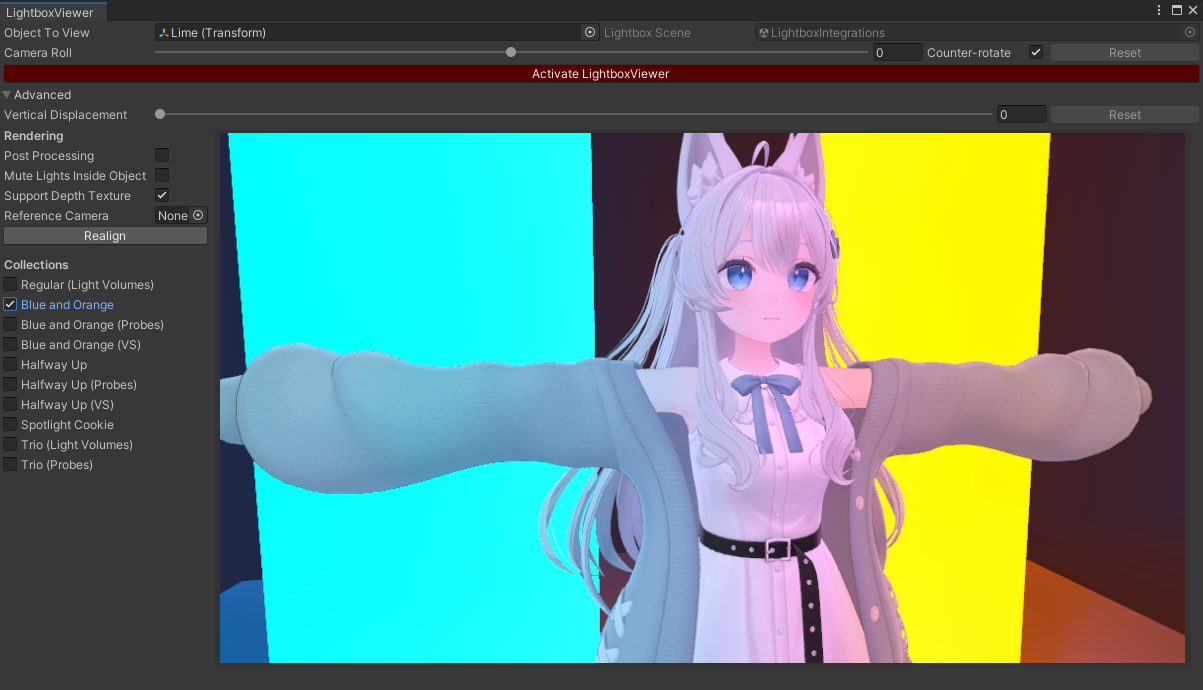
<li>Add Collections of lightboxes. Users may now switch from the default six lightboxes to other more specialized ones.<!-- -->
<ul>
<li>Add special lightboxes specifically for Light Volumes. This requires the Light Volumes package to be installed.</li>
<li>Expose the Spotlight Cookie lightbox that was previously hidden.</li>
</ul>
</li>
<li>Previously, lights inside the object being viewed were disabled. This is no longer the case by default.</li>
<li>Add option to disable lights inside the object being viewed.</li>
<li>Add option to support shaders that require a Depth Texture.<!-- -->
<ul>
<li>This uses <a href="https://github.com/poiyomi/PoiyomiToonShader/blob/master/_PoiyomiShaders/Prefabs/DepthGet.prefab" target="_blank" rel="noopener noreferrer">Poiyomi's DepthGet</a> light settings, but repackaged with a different GUID to avoid installation conflicts.</li>
</ul>
</li>
<li>The Advanced menu is now a sidebar.</li>
<li>Some settings are now saved editor-wide, instead of being reset when the Lightbox Viewer window is closed.<!-- -->
<ul>
<li>This includes <em>Counter Rotate, Post Processing, Vertical Displacement, Mute Lights Inside Object, Support Depth Texture</em>.</li>
</ul>
</li>
</ul>
<p><img decoding="async" loading="lazy" alt="Unity_a6UfNnk6f1.png" src="https://docs.hai-vr.dev/ja/assets/images/Unity_a6UfNnk6f1-8aae1a6f3c14ecbea9591430c242a296.png" width="1203" height="690" class="img_ev3q"></p>
<video controls="" muted="" width="816"><source src="https://large.docs.cdn.hai-vr.dev/assets/docs/6bNmaNelyD.mp4"></video>]]></content>
    </entry>
    <entry>
        <title type="html"><![CDATA[✨ Lightbox Viewer V2.3.0]]></title>
        <id>https://docs.hai-vr.dev/ja/updates/2025/05/20/p0</id>
        <link href="https://docs.hai-vr.dev/ja/updates/2025/05/20/p0"/>
        <updated>2025-05-20T00:00:00.000Z</updated>
        <summary type="html"><![CDATA[Add support for Light Volumes if it is installed in the project.]]></summary>
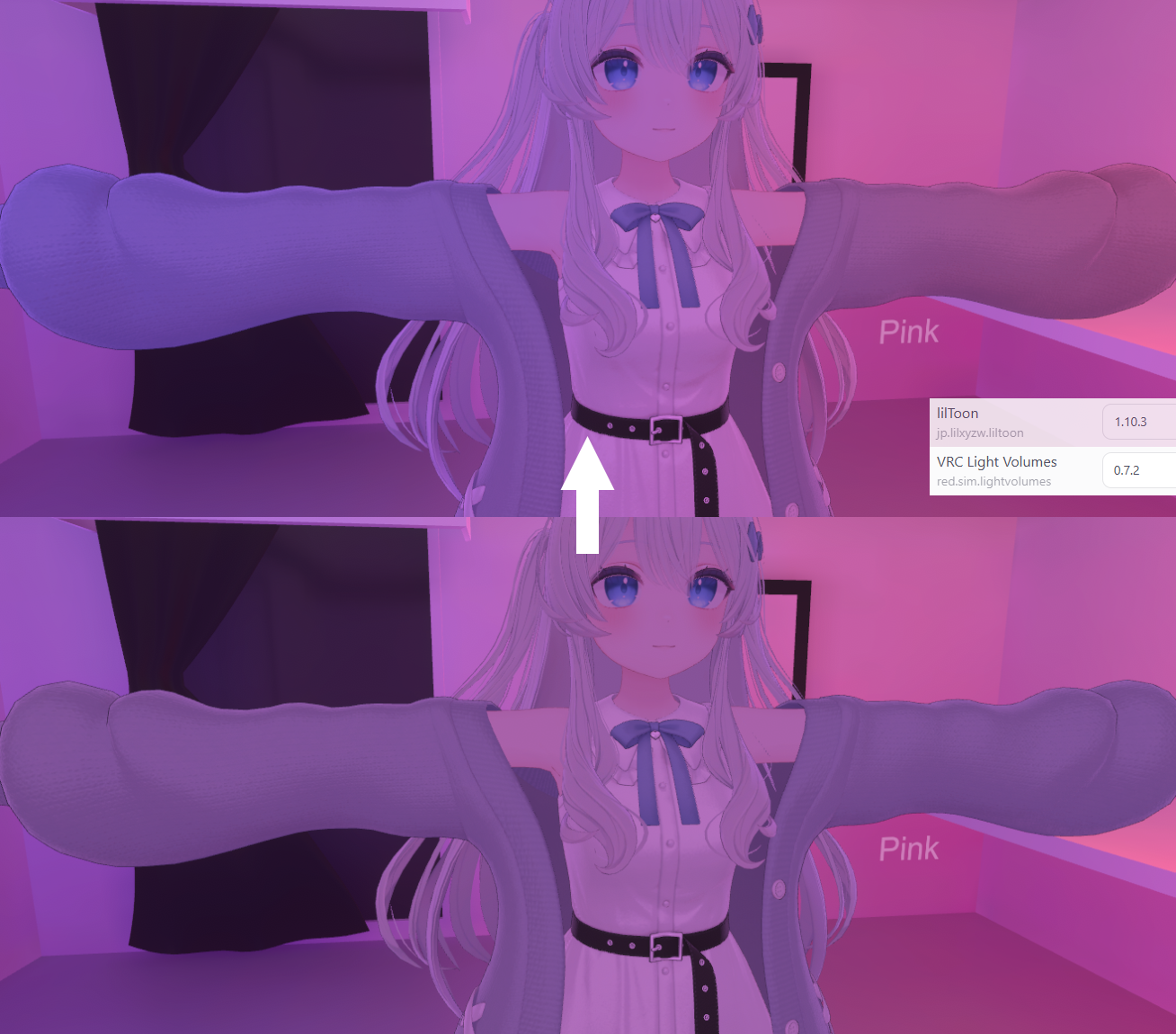
        <content type="html"><![CDATA[<p>Add support for <a href="https://github.com/REDSIM/VRCLightVolumes" target="_blank" rel="noopener noreferrer">Light Volumes</a> if it is installed in the project.</p>
<p>The lightboxes themselves do not change, so the differences are subtle.
The Pink scene is the most notable because the left hand will be lit pink and the right hand will be lit purple.</p>
<div class="theme-admonition theme-admonition-warning admonition_xJq3 alert alert--warning"><div class="admonitionHeading_Gvgb"><span class="admonitionIcon_Rf37"><svg viewBox="0 0 16 16"><path fill-rule="evenodd" d="M8.893 1.5c-.183-.31-.52-.5-.887-.5s-.703.19-.886.5L.138 13.499a.98.98 0 0 0 0 1.001c.193.31.53.501.886.501h13.964c.367 0 .704-.19.877-.5a1.03 1.03 0 0 0 .01-1.002L8.893 1.5zm.133 11.497H6.987v-2.003h2.039v2.003zm0-3.004H6.987V5.987h2.039v4.006z"></path></svg></span>警告</div><div class="admonitionContent_BuS1"><p>If you want the <strong>previews</strong> to use light volumes, please understand that <em>unlike avatar uploads</em>, is it not sufficient to have a compatible shader like lilToon 1.10;
you need the actual <a href="https://github.com/REDSIM/VRCLightVolumes?tab=readme-ov-file#installation-through-vrchat-creator-companion" target="_blank" rel="noopener noreferrer">Light Volumes package</a> installed in your avatar project.</p></div></div>
<p><img decoding="async" loading="lazy" alt="lightvolume-Unity_jqyphEGfvy.png" src="https://docs.hai-vr.dev/ja/assets/images/lightvolume-Unity_jqyphEGfvy-b32accc81cfee75839537b4d9ac610ae.png" width="1308" height="1150" class="img_ev3q"></p>
<video controls="" muted="" width="816" loop=""><source src="https://large.docs.cdn.hai-vr.dev/assets/docs/gvIpDdvoyu.mp4"></video>]]></content>
    </entry>
    <entry>
        <title type="html"><![CDATA[⚙️ Prefabulous Universal V2.2.0-alpha.0 / PPC V2.1.0-alpha.0 / FaceTra compatibility patch]]></title>
        <id>https://docs.hai-vr.dev/ja/updates/2025/05/15/p0</id>
        <link href="https://docs.hai-vr.dev/ja/updates/2025/05/15/p0"/>
        <updated>2025-05-15T00:00:00.000Z</updated>
        <summary type="html"><![CDATA[This update is targeted specifically at Modular Avatar for Resonite users.]]></summary>
        <content type="html"><![CDATA[<p><strong>This update is targeted specifically at <a href="https://github.com/bdunderscore/modular-avatar-resonite" target="_blank" rel="noopener noreferrer">Modular Avatar for Resonite</a> users.</strong></p>
<p>This update enables all Prefabulous Universal components to execute during builds targeting the Resonite app.</p>
<p>If you use <em>Modular Avatar for Resonite</em>, it is very likely you already have prerelease packages enabled in ALCOM,
meaning you may update Prefabulous Universal to <strong>V2.2.0-alpha.0</strong> using ALCOM.</p>
<p>If you use <em>FaceTra Shape Creator</em>, you need to download <a href="https://docs.hai-vr.dev/ja/docs/products/facetra-shape-creator/modular-avatar-for-resonite-patch">a patch linked here</a>, <strong>no log-in required</strong>.</p>
<h2 class="anchor anchorWithStickyNavbar_LWe7" id="prefabulous-universal-220-alpha0">Prefabulous Universal 2.2.0-alpha.0<a href="https://docs.hai-vr.dev/ja/updates/2025/05/15/p0#prefabulous-universal-220-alpha0" class="hash-link" aria-label="Prefabulous Universal 2.2.0-alpha.0 への直接リンク" title="Prefabulous Universal 2.2.0-alpha.0 への�直接リンク">​</a></h2>
<p>Support <a href="https://github.com/bdunderscore/modular-avatar-resonite" target="_blank" rel="noopener noreferrer">Modular Avatar for Resonite</a>:</p>
<ul>
<li>Add support for cross-application build compatibility being introduced in NDMF 1.8.</li>
<li>Conditionally compiled when NDMF 1.8.0-alpha.0 is installed:<!-- -->
<ul>
<li>Prefabulous Universal still needs to be compatible with VNyan (Unity 2020) and Warudo (Unity 2021), meaning we still need to support NDMF 1.4 (last known working version in Unity 2020).</li>
</ul>
</li>
</ul>
<h2 class="anchor anchorWithStickyNavbar_LWe7" id="prefabulous-for-platform-conversions-210-alpha0">Prefabulous for Platform Conversions 2.1.0-alpha.0<a href="https://docs.hai-vr.dev/ja/updates/2025/05/15/p0#prefabulous-for-platform-conversions-210-alpha0" class="hash-link" aria-label="Prefabulous for Platform Conversions 2.1.0-alpha.0 への直接リンク" title="Prefabulous for Platform Conversions 2.1.0-alpha.0 への直接リンク">​</a></h2>
<ul>
<li>Fix ConvertVRCConstraintsToUnityConstraints should run after Modular Avatar creates constraints:<!-- -->
<ul>
<li>Run after Modular Avatar, because MA Convert Constraints and MA World Fixed Object create VRCConstraint.</li>
<li>Also, remove this component during the build to help missing script issues (e.g. better handles CVR).</li>
<li>The above changes have been contributed by <strong><a href="https://github.com/Narazaka" target="_blank" rel="noopener noreferrer">Narazaka</a></strong> (first contribution).</li>
</ul>
</li>
<li>Integrate with NDMF 1.8 cross-application builds:<!-- -->
<ul>
<li>Add support for cross-application build compatibility being introduced in NDMF 1.8.</li>
<li>MA/NDMF for Resonite does not support Unity constraints at this time of writing, but as far as I am aware there is no harm done enabling this conversion plugin pass for all platforms.</li>
<li>Conditionally compiled when NDMF 1.8.0-alpha.0 is installed:<!-- -->
<ul>
<li>Prefabulous for Platform Conversions still needs to be compatible with VNyan (Unity 2020) and Warudo (Unity 2021), meaning we still need to support NDMF 1.4 (last known working version in Unity 2020).</li>
</ul>
</li>
</ul>
</li>
</ul>]]></content>
    </entry>
    <entry>
        <title type="html"><![CDATA[✨ Activate with Skinned Offsets (Constraint Tools V1)]]></title>
        <id>https://docs.hai-vr.dev/ja/updates/2025/05/05/p0</id>
        <link href="https://docs.hai-vr.dev/ja/updates/2025/05/05/p0"/>
        <updated>2025-05-05T00:00:00.000Z</updated>
        <summary type="html"><![CDATA[A new menu option named Activate with Skinned Offsets is added in]]></summary>
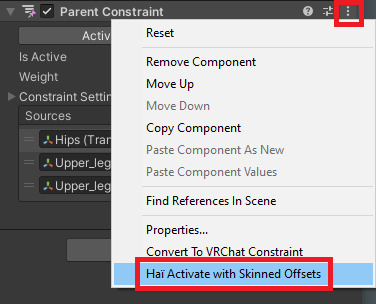
        <content type="html"><![CDATA[<p>A new menu option named <a href="https://docs.hai-vr.dev/ja/docs/products/constraint-tools/activate-with-skinned-offsets">Activate with Skinned Offsets</a> is added in
the inspector of the Parent Constraint and VRC Parent Constraint components.</p>
<p>Pressing this menu option will behave similarly to the <em>Activate</em> button on the Parent constraint, but <strong>calculates different offsets</strong>:
These offsets will make the Parent constraint behave more like weight painting/mesh skinning.</p>
<p>This is the same algorithm that is used by the <a href="https://docs.hai-vr.dev/ja/docs/products/constraint-tools/skinned-mesh-constraint">Skinned Mesh Constraint Builder</a> component.
If you are already using this component, you do not need to use this.</p>
<p><img decoding="async" loading="lazy" alt="mspaint_US2AvDUNAt.png" src="https://docs.hai-vr.dev/ja/assets/images/mspaint_US2AvDUNAt-98a16aa572a04a7534199b61b70deefb.png" width="376" height="304" class="img_ev3q"></p>
<p>🗒️ <a href="https://docs.hai-vr.dev/ja/docs/products/constraint-tools/activate-with-skinned-offsets">Open documentation</a></p>]]></content>
    </entry>
    <entry>
        <title type="html"><![CDATA[☀️ Skinned Mesh Constraint Builder (Constraint Tools V1)]]></title>
        <id>https://docs.hai-vr.dev/ja/updates/2025/05/01/p0</id>
        <link href="https://docs.hai-vr.dev/ja/updates/2025/05/01/p0"/>
        <updated>2025-05-01T00:00:00.000Z</updated>
        <summary type="html"><![CDATA[A new component, Skinned Mesh Constraint Builder, has been introduced to a new package.]]></summary>
        <content type="html"><![CDATA[<p>A new component, <a href="https://docs.hai-vr.dev/ja/docs/products/constraint-tools/skinned-mesh-constraint">Skinned Mesh Constraint Builder</a>, has been introduced to a new package.</p>
<p>This component creates a parent constraint that moves with the closest polygon of a Skinned Mesh Renderer.</p>
<p>Use this component when you notice that attaching an object to your body is not as straightforward as parenting to a bone.</p>
<video controls="" muted="" width="816"><source src="https://large.docs.cdn.hai-vr.dev/assets/docs/oSEDSUFVRj.mp4"></video>
<p>You may install the <a href="https://docs.hai-vr.dev/ja/docs/products/constraint-tools/skinned-mesh-constraint#download">new package <em>Haï ~ Skinned Mesh Constraint</em></a> using ALCOM.</p>]]></content>
    </entry>
    <entry>
        <title type="html"><![CDATA[⚠️ Advance notice for VRChat Creator Companion changes]]></title>
        <id>https://docs.hai-vr.dev/ja/updates/2024/12/23/p0</id>
        <link href="https://docs.hai-vr.dev/ja/updates/2024/12/23/p0"/>
        <updated>2024-12-23T00:00:00.000Z</updated>
        <summary type="html"><![CDATA[Starting from the 1st of February 2025, my repository listing will no longer]]></summary>
        <content type="html"><![CDATA[<p>Starting from the 1st of February 2025, <a href="https://docs.hai-vr.dev/ja/docs/products/listing">my repository listing</a> will no longer
officially support the <em>VRChat Creator Companion</em> package manager. Instead, it will support the ALCOM package manager.</p>
<h2 class="anchor anchorWithStickyNavbar_LWe7" id="what-happens-if-i-continue-using-the-vrchat-creator-companion-to-install-this-repository">What happens if I continue using the <em>VRChat Creator Companion</em> to install this repository?<a href="https://docs.hai-vr.dev/ja/updates/2024/12/23/p0#what-happens-if-i-continue-using-the-vrchat-creator-companion-to-install-this-repository" class="hash-link" aria-label="what-happens-if-i-continue-using-the-vrchat-creator-companion-to-install-this-repository への直接リンク" title="what-happens-if-i-continue-using-the-vrchat-creator-companion-to-install-this-repository への直接リンク">​</a></h2>
<p>In many cases you <em>might</em> still be able to install the packages from the <em>VRChat Creator Companion</em>.</p>
<p>However, if there are any issues occuring within the <em>VRChat Creator Companion</em> during the installation process,
<strong>then it will be considered to be an issue within the <em>VRChat Creator Companion</em> software itself</strong>,
and workarounds will no longer be provided.</p>
<h2 class="anchor anchorWithStickyNavbar_LWe7" id="what-should-i-do-if-i-still-use-the-vrchat-creator-companion-and-an-error-occurs-in-vcc">What should I do if I still use the <em>VRChat Creator Companion</em>, and an error occurs in VCC?<a href="https://docs.hai-vr.dev/ja/updates/2024/12/23/p0#what-should-i-do-if-i-still-use-the-vrchat-creator-companion-and-an-error-occurs-in-vcc" class="hash-link" aria-label="what-should-i-do-if-i-still-use-the-vrchat-creator-companion-and-an-error-occurs-in-vcc への直接リンク" title="what-should-i-do-if-i-still-use-the-vrchat-creator-companion-and-an-error-occurs-in-vcc への直接リンク">​</a></h2>
<p>If you still use the VRChat Creator Companion, and an error occurs in VCC during the installation of some packages from this repository,
then:</p>
<h3 class="anchor anchorWithStickyNavbar_LWe7" id="install-the-alcom-package-manager">Install the ALCOM package manager<a href="https://docs.hai-vr.dev/ja/updates/2024/12/23/p0#install-the-alcom-package-manager" class="hash-link" aria-label="Install the ALCOM package manager への直接リンク" title="Install the ALCOM package manager への直接リンク">​</a></h3>
<p>I recommend that you install the ALCOM package manager.</p>
<p><a href="https://vrc-get.anatawa12.com/alcom/" target="_blank" rel="noopener noreferrer">ALCOM</a> (<a href="https://github.com/vrc-get/vrc-get" target="_blank" rel="noopener noreferrer">GitHub</a>) is a community-created package manager. It is functionally equivalent to the <em>VRChat Creator Companion</em>,
but <strong>contains fixes</strong> to many bugs that had been reported in the <em>VRChat Creator Companion</em> for years.</p>
<h3 class="anchor anchorWithStickyNavbar_LWe7" id="report-the-vcc-bugs-to-vrchat">Report the VCC bugs to VRChat<a href="https://docs.hai-vr.dev/ja/updates/2024/12/23/p0#report-the-vcc-bugs-to-vrchat" class="hash-link" aria-label="Report the VCC bugs to VRChat への直接リンク" title="Report the VCC bugs to VRChat への直接リンク">​</a></h3>
<p>Report the bugs you have encountered in VCC directly to VRChat Inc. through either the feedback forum, or the <a href="https://github.com/vrchat-community/creator-companion/issues" target="_blank" rel="noopener noreferrer">GitHub issues</a>.</p>
<p>The bug you have encountered has most likely been reported already in 2022 or 2023.</p>
<h2 class="anchor anchorWithStickyNavbar_LWe7" id="what-if-i-already-use-alcom">What if I already use ALCOM?<a href="https://docs.hai-vr.dev/ja/updates/2024/12/23/p0#what-if-i-already-use-alcom" class="hash-link" aria-label="What if I already use ALCOM? への直接リンク" title="What if I already use ALCOM? への直接リンク">​</a></h2>
<p>There is no action to do if you already use ALCOM. Check out <a href="https://github.com/anatawa12" target="_blank" rel="noopener noreferrer">anatawa12's GitHub page</a>.</p>]]></content>
    </entry>
    <entry>
        <title type="html"><![CDATA[🧪 Knowledge sharing "Running Modular Avatar on other apps"]]></title>
        <id>https://docs.hai-vr.dev/ja/updates/2024/12/08/p0-ks</id>
        <link href="https://docs.hai-vr.dev/ja/updates/2024/12/08/p0-ks"/>
        <updated>2024-12-08T00:00:00.000Z</updated>
        <summary type="html"><![CDATA[A new knowledge sharing article has been published, "Running Modular Avatar on other apps".]]></summary>
        <content type="html"><![CDATA[<p>A new knowledge sharing article has been published, "Running Modular Avatar on other apps".</p>
<ul>
<li>2024-12-08<!-- -->
<ul>
<li><a href="https://docs.hai-vr.dev/ja/docs/research/other/modular-avatar-on-other-apps">"Running Modular Avatar on other apps"</a></li>
<li><a href="https://docs.hai-vr.dev/ja/docs/research/other/modular-avatar-on-other-apps-ja">"他のアプリケーションでModular Avatarを動かす方法"</a></li>
</ul>
</li>
</ul>
<p>🔍 <a href="https://docs.hai-vr.dev/ja/docs/research/articles">View articles</a></p>]]></content>
    </entry>
    <entry>
        <title type="html"><![CDATA[✨ Transfer Blendshape (Starmesh V1.7.0)]]></title>
        <id>https://docs.hai-vr.dev/ja/updates/2024/12/06/p0</id>
        <link href="https://docs.hai-vr.dev/ja/updates/2024/12/06/p0"/>
        <updated>2024-12-06T00:00:00.000Z</updated>
        <summary type="html"><![CDATA[✨ New component: Transfer Blendshape]]></summary>
        <content type="html"><![CDATA[<h3 class="anchor anchorWithStickyNavbar_LWe7" id="-new-component-transfer-blendshape">✨ New component: Transfer Blendshape<a href="https://docs.hai-vr.dev/ja/updates/2024/12/06/p0#-new-component-transfer-blendshape" class="hash-link" aria-label="✨ New component: Transfer Blendshape への直接リンク" title="✨ New component: Transfer Blendshape への直接リンク">​</a></h3>
<p>The <em>Starmesh Op. Transfer Blendshape</em> component <strong>attempts</strong> to create a blendshape on a costume that mimics the movement
of a blendshape from another mesh.</p>
<p>Try using this to transfer nail deformations, chest deformations, or hip deformations (i.e. <code>Hip_big</code>) from a base mesh to a costume.</p>
<p>Combine it with other Selectors to limit the areas affected by the transferred deformations.</p>
<div class="theme-admonition theme-admonition-warning admonition_xJq3 alert alert--warning"><div class="admonitionHeading_Gvgb"><span class="admonitionIcon_Rf37"><svg viewBox="0 0 16 16"><path fill-rule="evenodd" d="M8.893 1.5c-.183-.31-.52-.5-.887-.5s-.703.19-.886.5L.138 13.499a.98.98 0 0 0 0 1.001c.193.31.53.501.886.501h13.964c.367 0 .704-.19.877-.5a1.03 1.03 0 0 0 .01-1.002L8.893 1.5zm.133 11.497H6.987v-2.003h2.039v2.003zm0-3.004H6.987V5.987h2.039v4.006z"></path></svg></span>警告</div><div class="admonitionContent_BuS1"><p><strong>This component may not always produce good results.</strong></p><p>In addition, if you use other tools that attempt to fit a costume on an avatar it was not designed for (i.e. fitting a costume made for Manuka on a Lime base body),
it will probably not work as this operator expects the mesh data to overlap, regardless of how bones are arranged in the scene.</p></div></div>
<video controls="" muted="" width="816"><source src="https://large.docs.cdn.hai-vr.dev/assets/docs/2024-12-06-transfer-blendshape-f.mp4"></video>
<p>🗒️ <a href="https://docs.hai-vr.dev/ja/docs/products/starmesh/operators/transfer-blendshape">Open documentation</a></p>]]></content>
    </entry>
</feed>